TikTok Shop Inactive Seller Policy Philippines 2026: 7-Day Warning, 40-Day Rule & Reactivation Guide
Jayson28 Sep 2026 12:21ENCopy link & title
TikTok Shop has introduced updated requirements for keeping seller accounts active. Under the policy, a Philippine seller may be classified as inactive after 40 calendar days without interacting with the TikTok Shop account.
This matters even if a store is temporarily receiving no orders. Once a shop is assessed as inactive, its products can be automatically deactivated and become unavailable to both buyers and affiliate creators. Buyer communication can also be restricted.
Here is what counts as account activity, what happens during the 40-day timeline, and how sellers managing several TikTok Shop stores can reduce the risk of overlooking one.
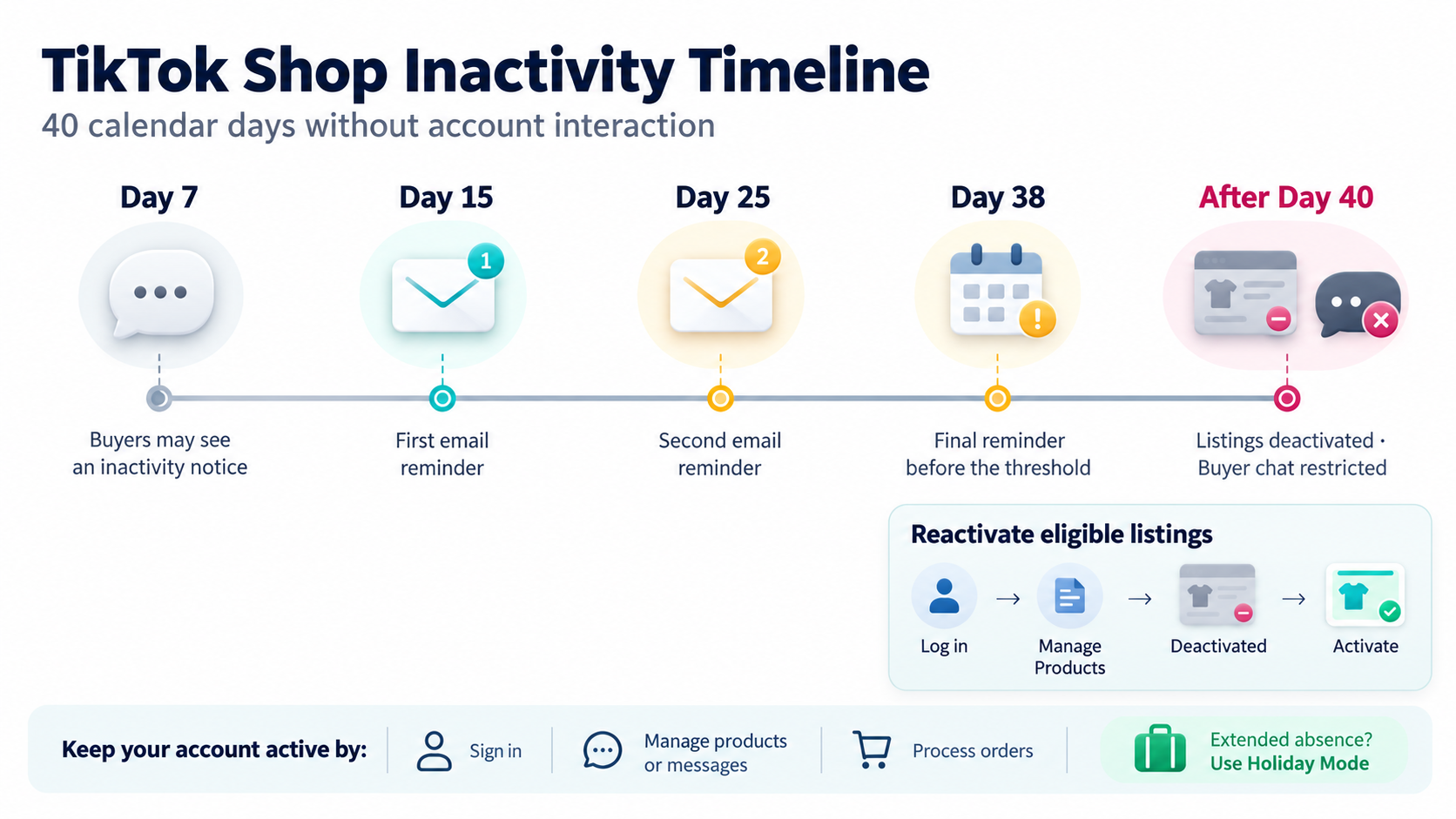
Quick answer: TikTok Shop may consider a seller inactive after 40 calendar days without account interaction. After 7 days, buyers starting a chat may see an inactivity notice. After 40 days, listings are automatically deactivated and the seller can no longer chat with buyers.
1. What Is the TikTok Shop Inactive Seller Policy?
Effective September 17, 2026, TikTok Shop updated the requirements sellers must meet to keep their shops active. The rule applies to Philippine sellers and focuses on whether they continue to access and manage their accounts.
According to the official TikTok Shop Inactive Seller Accounts policy, sellers can interact with their accounts through Seller Center or an Independent Software Vendor, also known as an ISV, or API platform.
What counts as account activity?
TikTok Shop lists several examples of valid interaction:
- Logging in to Seller Center or an ISV/API platform
- Modifying product information
- Processing orders or changing order statuses
- Responding to customer-service enquiries
If a shop has orders, the seller must process them and update the relevant status to Ready to Ship. If there are no orders, the seller still needs to interact with the account. Simply leaving products online without checking the store is not a reliable way to demonstrate active management.
2. What Happens When a TikTok Shop Becomes Inactive?
The policy includes several warning points before the 40-day threshold. Sellers should pay particular attention to email reminders and buyer-chat changes.
| Inactivity stage | What happens | Recommended action |
|---|---|---|
| After 7 days | Buyers who initiate a chat may be informed that the seller's account is inactive. | Log in and review messages, orders and store notifications. |
| Day 15 | TikTok Shop sends an email reminder after the seller's last login. | Confirm that the account remains accessible and properly managed. |
| Day 25 | A second reminder is sent. | Review products, customer enquiries and pending orders. |
| Day 38 | A reminder is sent shortly before the inactivity threshold. | Perform a genuine store-management action immediately. |
| After 40 days | Product listings are deactivated, and the seller can no longer chat with buyers. | Log in and reactivate the affected products. |
Deactivated products receive a Deactivated status and are no longer visible or accessible to customers or creators. This is different from permanent account closure: sellers can log back in and restore eligible listings.
3. How Can Philippine Sellers Keep Their TikTok Shop Active?
If your store has new orders
Check new and pending orders regularly, process them before the applicable fulfillment deadline, and make sure they reach the required Ready to Ship status. Logging in while leaving orders unprocessed does not replace the seller's fulfillment responsibilities.
If your store currently has no orders
A seller does not need to generate a sale just to keep a shop active. Instead, access the account through Seller Center or an authorized ISV/API platform and carry out normal store-management activities. This can include checking listings, updating product information, reviewing notifications or responding to customer enquiries.
If you will be away for an extended period
Enable Holiday Mode before leaving the business unattended. TikTok Shop states that shops in Holiday Mode will not be considered inactive under this policy. It also prevents active listings from continuing to generate orders when no one is available to fulfill them.
4. How to Reactivate an Inactive TikTok Shop
If TikTok Shop has marked the account as inactive, log in to Seller Center first. Then reactivate the affected listings:
- Go to Manage Products.
- Open the Deactivated tab.
- Select the products you want to restore, or select all eligible products.
- Click Activate.
- Confirm that the listings are visible again, then check for pending orders, messages and account notifications.
If products cannot be reactivated, review the notice shown in Seller Center and submit a support ticket when necessary. Sellers using an external management system should also confirm that the store authorization has not expired.
5. Manage Multiple TikTok Shop Stores More Efficiently with BigSeller
The inactivity policy is especially relevant to businesses managing several TikTok Shop accounts. A smaller store or a shop with no recent sales can be forgotten while the team focuses on higher-volume channels.
BigSeller allows supported TikTok Shop stores to be connected through TikTok Shop's official authorization process. After authorization, sellers can centrally view and process supported orders, manage products, monitor fulfillment statuses and organize stores with Store Groups instead of repeatedly switching between different Seller Center accounts.
For example, operators can use Store Groups to filter new, in-process, to-pickup and shipped orders from selected stores. Centralized order processing also makes it easier to identify shops with pending orders or expired authorization before they are overlooked.
Because TikTok Shop recognizes access through an ISV/API platform as account interaction, including connected stores in a regular BigSeller operating workflow can help sellers manage store activity more consistently. Sellers should still keep each authorization valid and confirm that order and status updates have synchronized successfully.
Learn how to connect TikTok Shop stores to BigSeller, organize stores with Store Groups, and process multi-store orders in one system.

Final Takeaway
The TikTok Shop inactive seller policy does not only affect abandoned shops. It can also affect seasonal stores, backup accounts and lower-volume shops that are still part of an active ecommerce business.
Check every store regularly, process orders on time, use Holiday Mode during extended absences and keep connected systems properly authorized. For businesses operating multiple TikTok Shop stores, a centralized workflow through BigSeller can make these routine checks easier to maintain.